First Steps with CTRL-OS
This section explains common first steps to use CTRL-OS. We start with enabling your development system and then continue with enabling CTRL-OS in a project.
Developer Setup
We recommend a set of Nix settings on your development system to ease development with CTRL-OS. The most important step is enabling the CTRL-OS binary cache to avoid spending a lot of time compiling software that our internal CI has already built.
On NixOS: Using the CTRL-OS Developer Module
If your development system runs NixOS, you can use our
ctrl-os.developer module to simplify setting it up for CTRL-OS
development. If you run NixOS, we trust you already know how to use
modules.
Info
The best NixOS version for your development system is the latest NixOS release (or unstable if you dare). CTRL-OS is not meant to be used for desktop systems for now!
On a Flakes system, add github:cyberus-ctrl-os/ctrl-os-modules as a
flake input. You can then find the developer module as
ctrl-os-modules.nixosModules.developer.
Without Flakes, you can just import the developer module directly:
let
  ctrl-os-modules = builtins.fetchGit {
    url = "https://github.com/cyberus-ctrl-os/ctrl-os-modules";
  };
in
import (ctrl-os-modules + "/modules/developer.nix")
Once you have imported the module, you have to enable it in your configuration:
ctrl-os.developer.enable = true;
Once you have rebuilt your system, Nix uses our binary cache.
Other Systems: Configuring the Binary Cache Manually
To configure the binary cache, add it as one of the substituters and
add the corresponding public key in your nix.conf. On Linux,
nix.conf is typically located in your home directory in
.config/nix/nix.conf.
Add the end, add:
extra-substituters = https://cache.ctrl-os.com/
extra-trusted-public-keys = ctrl-os:baPzGxj33zp/P+GAIJXsr8ss9Law+qEEFViX1+flbv8=
After editing nix.conf, you are ready to go.
Using CTRL-OS
CTRL-OS is a drop-in replacement for NixOS and Nixpkgs. To use CTRL-OS, your project needs to use the CTRL-OS sources instead of the Nixpkgs sources. To fetch the sources from CTRL-OS we provide a tarball.
The way to fetch CTRL-OS depends on the way your project is structured.
For a NixOS system, the common ways are using Nix channels or Flakes.
For any other project depending on Nixpkgs, the pinned reference to Nixpkgs needs to be updated, whether it's through Flakes, npins, Nix, or other schemes. The rest of this document guides you through the process of using CTRL-OS in these scenarios.
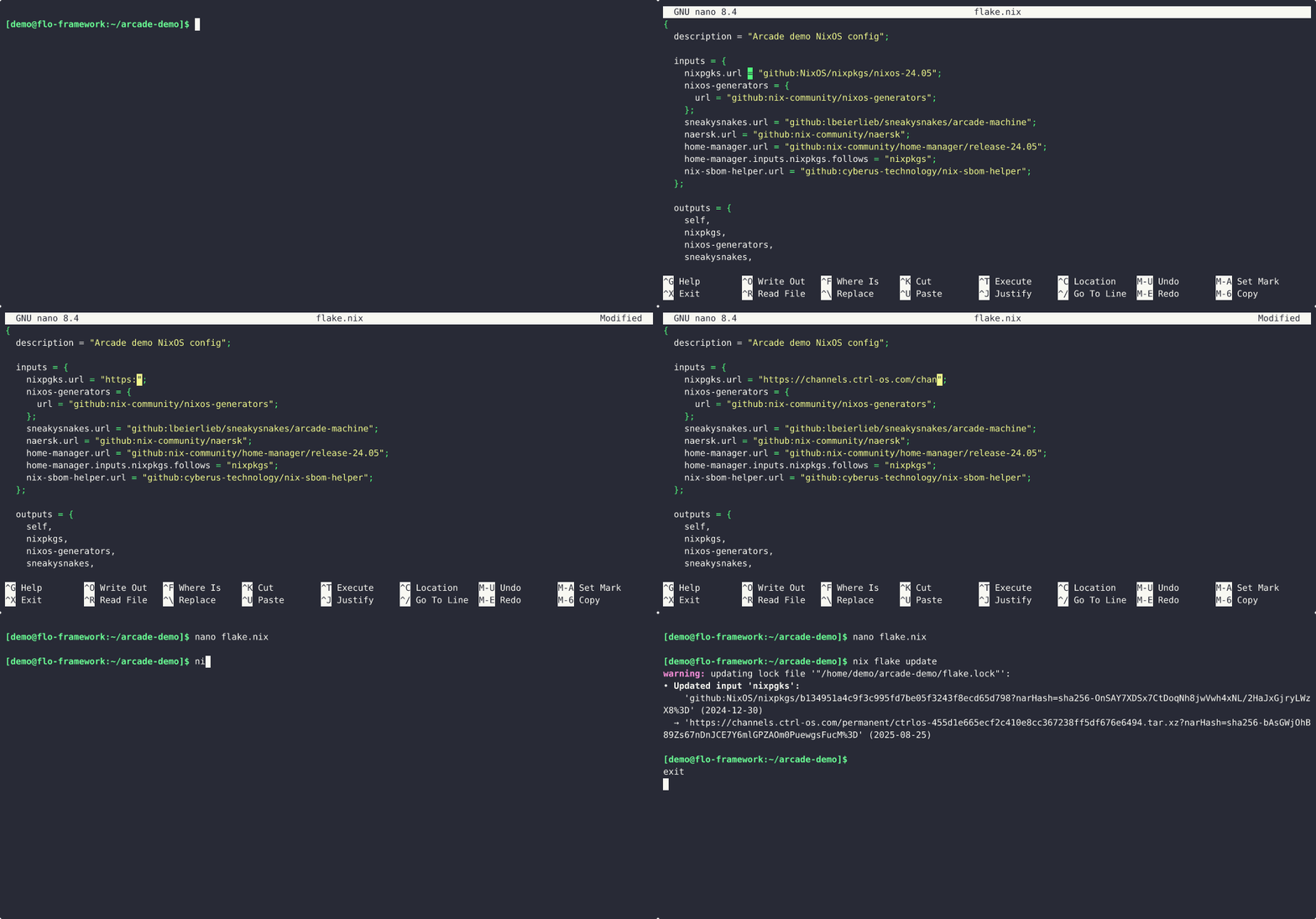
Using CTRL-OS with a NixOS system
As a Flake input
The CTRL-OS release tarball can be used as a Flake input. To use it, you change the nixpkgs input in your Flake to point to the CTRL-OS release tarball instead:
inputs = {
  # Change the nixpkgs.url to point to the tarball:
  nixpkgs.url = "https://channels.ctrl-os.com/channel/ctrlos-26.05.tar.xz";
};
Afterward, be sure to update the lock file:
$ nix flake lock
• Updated input 'nixpkgs':
    'github:NixOS/nixpkgs/0000000000000000000000000000000000000000' (2026-06-30)
  → 'https://channels.ctrl-os.com/permanent/ctrlos-eeeeeeeeeeeeeeeeeeeeeeeeeeeeeeeeeeeeeeee.tar.xz?narHash=sha256-AAAAAAAAAAAAAAAAAAAAAAAAAAAAAAAAAAAAAAAAAAA%3D' (20XX-MM-DD)
Now the system will build using the pinned CTRL-OS.
As a system-wide channel
If your system uses the nix-channel semantics, you need to change the system-wide nixos channel reference to refer to the CTRL-OS tarball.
This follows the same procedure as upgrading between NixOS releases.
The channel name is still nixos (the last parameter) as this is the identifier used to refer to the Nixpkgs input when building NixOS with nix-channel semantics.
$ sudo nix-channel --list
nixos https://channels.nixos.org/nixos-26.05

$ sudo nix-channel --add https://channels.ctrl-os.com/channel/ctrlos-26.05.tar.xz nixos

$ sudo nix-channel --list
nixos https://channels.ctrl-os.com/channel/ctrlos-26.05.tar.xz

$ sudo nix-channel --update
this derivation will be built:
  /nix/store/eeeeeeeeeeeeeeeeeeeeeeeeeeeeeeee-nixos-26.05.tar.xz.drv
building '/nix/store/eeeeeeeeeeeeeeeeeeeeeeeeeeeeeeee-nixos-26.05.tar.xz.drv'...
unpacking 1 channels...
Note
When using the nix-channel semantics, a NixOS system evaluates using the system-wide channels,
which are owned and manage by the root user.
If your user has a nixos channel configured, you may want to remove it to prevent unexpected results.
Using CTRL-OS for other projects
Projects that are not building software using Nix instead of an operating system also benefit from CTRL-OS. The release cadence of NixOS makes it hard to keep using stable-versioned dependencies, while keeping-up with security issues.
CTRL-OS can be used in your Nix-built project, regardless of the way inputs are referenced.
As a Flake Input
Similarly to the system configuration, the release tarball can be used in any Flake.
Typically, the nixpkgs input would be set to the CTRL-OS release tarball.
# flake.nix
{
  description = "A Very Basic CTRL-OS Flake";

  inputs = {
    # Use the CTRL-OS release tarball as nixpkgs input.
    nixpkgs.url = "https://channels.ctrl-os.com/channel/ctrlos-26.05.tar.xz";
  };

  outputs = { self, nixpkgs }: {
    packages.x86_64-linux.hello = nixpkgs.legacyPackages.x86_64-linux.hello;
    packages.x86_64-linux.default = self.packages.x86_64-linux.hello;
  };
}
$ nix build '.#hello'
warning: creating lock file '.../flake.lock':
• Added input 'nixpkgs':
    'https://channels.ctrl-os.com/permanent/ctrlos-eeeeeeeeeeeeeeeeeeeeeeeeeeeeeeeeeeeeeeee.tar.xz?narHash=sha256-AAAAAAAAAAAAAAAAAAAAAAAAAAAAAAAAAAAAAAAAAAA%3D' (20XX-MM-DD)

$ readlink result
/nix/store/441agxbmdlhy3ldycc98dbl5id6fqv3j-hello-2.12.1

$ ./result/bin/hello
Hello, world!
As an npins pin
A sample project was initialized with npins init, and the following default.nix.
# default.nix
let
  sources = import ./npins;
  pkgs = import sources.nixpkgs {};
in
{
  inherit (pkgs)
    hello
  ;
}
Then npins add can be used to change the nixpkgs input URL.
$ npins add tarball --name nixpkgs https://channels.ctrl-os.com/channel/ctrlos-26.05.tar.xz
[INFO ] Adding 'nixpkgs' …
    url: https://channels.ctrl-os.com/channel/ctrlos-26.05.tar.xz
    hash: 0000000000000000000000000000000000000000000000000000
    frozen: false

$ git diff --unified=1
diff --git i/npins/sources.json w/npins/sources.json
index be53124..e407fd4 100644
--- i/npins/sources.json
+++ w/npins/sources.json
@@ -3,6 +3,5 @@
     "nixpkgs": {
-      "type": "Channel",
-      "name": "nixpkgs-unstable",
-      "url": "https://releases.nixos.org/nixpkgs/nixpkgs-26.05pre000000.eeeeeeeeeeee/nixexprs.tar.xz",
-      "hash": "0000000000000000000000000000000000000000000000000000"
+      "type": "Tarball",
+      "url": "https://channels.ctrl-os.com/channel/ctrlos-26.05.tar.xz",
+      "hash": "0000000000000000000000000000000000000000000000000000"
     }

$ nix-build --attr hello
/nix/store/441agxbmdlhy3ldycc98dbl5id6fqv3j-hello-2.12.1
Other input pinning tools
The approach is the same as with the previous examples: replace your pinned URL for the Nixpkgs 26.05 release tarball with the CTRL-OS 26.05 release tarball.
-  https://channels.nixos.org/nixos-26.05/nixexprs.tar.xz
+  https://channels.ctrl-os.com/channel/ctrlos-26.05.tar.xz
Don't forget to re-lock the dependencies, which will depend on the exact tool used!
As a user-configured channel
Warning
Outside of a system build, it is discouraged to rely on nix-channel for build inputs.
Using nix-channel semantics for non-system builds loses any tracking for the declared (or pinned) input for a given project.
Follow the instructions under As a system-wide channel. You may change the name of the input, as needed, and use nix-channel as your user instead of as root.
CTRL-OS Channels
The following channels are available for CTRL-OS:
| Version | Status | End of Life |
|---|---|---|
ctrlos-26.05 |
stable | May 2031 |